What Is the AI Vision USB HID Automation Controller?
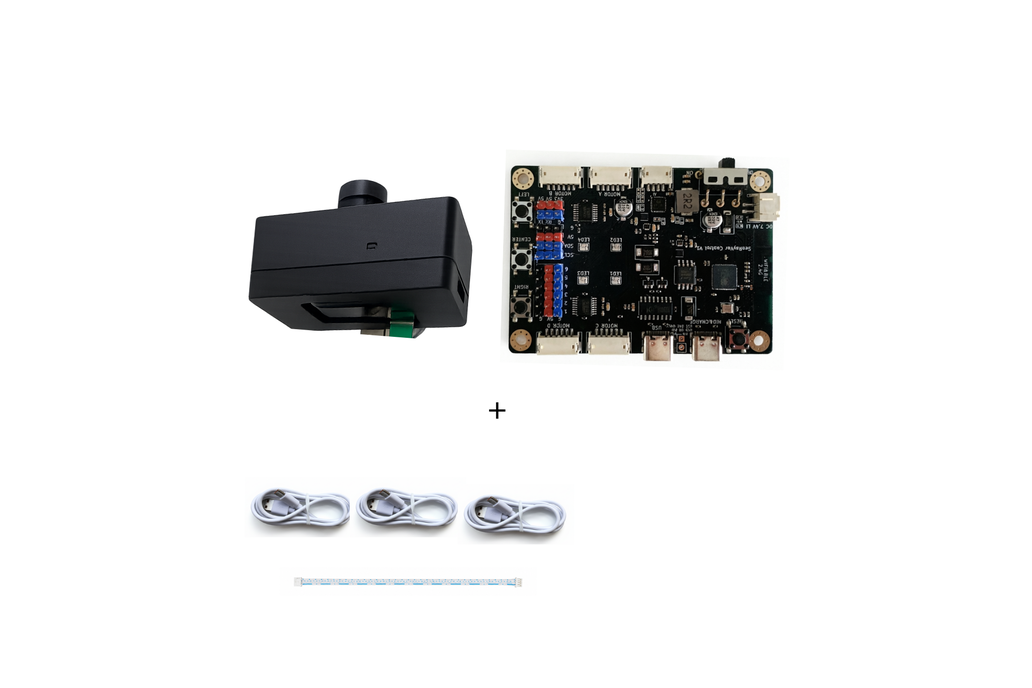
The AI Vision USB HID Automation Controller is a programmable device from Senrayvar AIVision that combines two powerful capabilities: AI-powered screen recognition and standard USB HID mouse/keyboard control. In plain terms, it can see what's on your screen and react to it by moving the mouse or typing — without touching your computer's software.
It ships from Guangzhou, China via Tindie for $99 + $10 shipping. Only 10 units are currently in stock, which is typical for indie maker hardware — small batches, direct from the maker.
How Does the AI Vision Recognition Work?
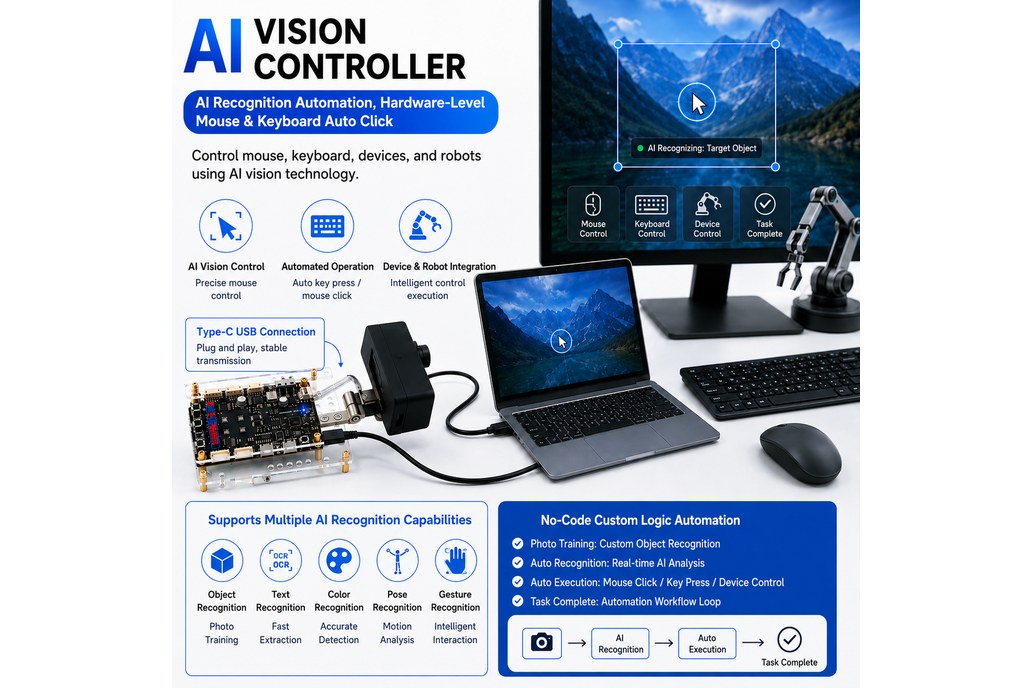
The controller uses a region-of-interest (ROI) approach to screen analysis. You define a specific area of the screen to monitor, and the AI system continuously analyzes what's visible in that region. It can recognize:
- Objects — detect specific items, icons, or UI elements on screen
- Colors — react to color changes in a defined area (e.g., status indicators, alerts)
- Text — read and respond to on-screen text (OCR-style recognition)
- Gestures — interpret visual patterns as triggers for actions
The ROI system is the key differentiator from generic screen-capture tools. By focusing on a specific screen region, the AI recognition runs faster and more reliably — critical for real-time automation where milliseconds matter.
What Programming Options Does It Support?
Two programming environments are available:
Blockly (Visual Programming)
Drag-and-drop visual programming for building automation workflows. No coding required — connect blocks that represent vision recognition, conditions (if/else), delays, loops, and actions (mouse/keyboard). Ideal for rapid prototyping and non-programmers.
Python
Full Python scripting for advanced logic, custom algorithms, and integration with external services. Use Python when you need conditional branching, data processing, API calls, or complex decision trees that go beyond what Blockly can express.
Workflow Model: See → Recognize → Decide → Act
The core automation loop follows a four-step pattern:
- See — the AI vision system captures and analyzes the defined screen region
- Recognize — the system identifies objects, colors, text, or patterns
- Decide — your Blockly or Python logic evaluates the recognition result
- Act — the USB HID interface executes mouse clicks, movements, or keyboard input
This is fundamentally different from coordinate-based automation tools. Instead of "click at pixel 500,300", you tell the system "click when you see the blue button" — the automation adapts to what's actually on screen, not fixed positions.
What Are the Technical Specs?
The USB HID interface is the clever part — to the computer, this device looks like a standard mouse and keyboard. No special drivers, no software installation, no API hooks. The automation runs on the controller hardware itself, independent of the host OS.
What Can You Build With This Controller?
Senrayvar lists six primary use cases, each with real commercial applications:
1. Game Automation Experiments
The controller can recognize game elements on screen and respond with mouse/keyboard inputs. This is useful for testing game mechanics, automating repetitive tasks in MMOs, or building accessibility tools for gamers with physical limitations.
2. UI and Software Testing
Automated QA testing that actually sees the screen instead of relying on API hooks. The vision system can verify that UI elements render correctly, check for visual regressions, and test user flows by "watching" the screen and reacting to what it sees.
3. Desktop Automation
Automate repetitive desktop workflows — data entry, form filling, file management, email processing. The vision-based approach means it works with any application, not just those that expose APIs or automation interfaces.
4. AI Agent Experiments
Build autonomous agents that interact with computers through vision. Think of it as a physical layer for AI agents — the AI "sees" the screen and the controller executes actions, creating a closed loop without software integration.
5. Computer Vision Projects
Use the vision system as a building block for custom CV applications — monitoring dashboards, reading gauges, tracking visual changes over time.
6. Programmable Mouse/Keyboard Projects
Even without the AI vision, the USB HID mouse/keyboard control is useful for any project that needs to send input to a computer — macros, accessibility tools, kiosk systems, or industrial control interfaces.
How to Build a Business Around This Controller
This isn't a resell product — at $99 per unit with only 10 in stock, the margins and volume don't support retail arbitrage. But the business angle is strong if you position it as a service tool.
Service Business Model — Automation Consulting
per automation project (setup + configuration)
| Controller cost | $109 |
| Your time (2–4 hours setup) | $100–200 |
| Total cost per project | $209–309 |
| Client charge | $350–800 |
| Profit per project | $141–491 |
Target Clients
- Small businesses — automate data entry, invoice processing, inventory management
- QA teams — visual regression testing for web and desktop apps
- Content creators — automate social media posting, scheduling, analytics monitoring
- E-commerce sellers — automate listing management, price monitoring, order processing
The Competitive Advantage
Most automation tools require software installation, API access, or OS-level hooks. This controller works at the hardware level — it sees the screen and sends input like a human would. That means it works with any application, even legacy software, proprietary systems, or locked-down environments where you can't install automation agents.
Should You Buy the AI Vision USB HID Automation Controller?
⚡ Conditional Buy
Buy if: You're building an automation service business, need hardware-level screen automation for QA testing, or want to experiment with AI agents that interact with computers through vision. The $99 price point is reasonable for the capability.
Skip if: You're looking for a mass-market resell product (too expensive, limited stock), or you need software-level automation for a specific API-rich application (cheaper software tools exist for that).
Where to Buy
How This Compares
| Feature | This Product | Commercial Alternative |
|---|---|---|
| Price | $99 | $500-2000 |
| DIY Required | Yes | No |
| Profit Potential | High | N/A |
Buy on Tindie
The AI Vision USB HID Automation Controller is available exclusively on Tindie from Senrayvar AIVision. Price: $99 + $10 shipping (tracked, ships from China). Only 10 units in stock.
Tindie offers buyer protection on all purchases. Ships worldwide via YunExpress.
Done-for-You Playbook
Electronics Repair — From Zero to First $1,000
Everything you need to actually build this business — sourcing links, pricing calculators, client templates, and a 30-day action plan. Skip the guesswork.
What Do People Ask About the AI Vision HID Controller?
What is the AI Vision USB HID Automation Controller?
A programmable $99 controller from Tindie that combines AI screen recognition with USB HID mouse/keyboard control. It can see what's on your screen and react to it automatically — recognize objects, colors, text, or gestures in defined screen regions, then execute mouse clicks or keyboard input.
How much money can you make with an AI vision automation controller?
The controller is best used as a service tool, not a resell product. Automation consulting projects using this device can earn $141–491 profit per project at $350–800 client charges. Build a business around UI testing, desktop automation, or game automation services.
What programming languages does the AI Vision controller support?
Two environments: Blockly (visual drag-and-drop programming for rapid prototyping) and Python (full scripting for advanced logic and custom automation). The workflow follows a See → Recognize → Decide → Act model.
Where can I buy the AI Vision USB HID Automation Controller?
Available exclusively on Tindie from Senrayvar AIVision for $99 + $10 shipping. Ships from Guangzhou, China via YunExpress with tracking. Only 10 units in stock — limited indie maker hardware availability.
📬 Newsletter
One Bench-Tested Hardware Side Hustle. Every Tuesday.
Real teardowns, real profit math, real businesses. No fluff. No spam.
Join 847 makers. Unsubscribe anytime.
📅 Last reviewed: September 2026 · Prices may vary