Walk into any electronics supplier and you will find two names on the addressable strips. The WS2812B is the default, the cheap one, the one in nearly every starter kit. The SK6812 is the one sold as "RGBW", usually a little more expensive, usually described as better.
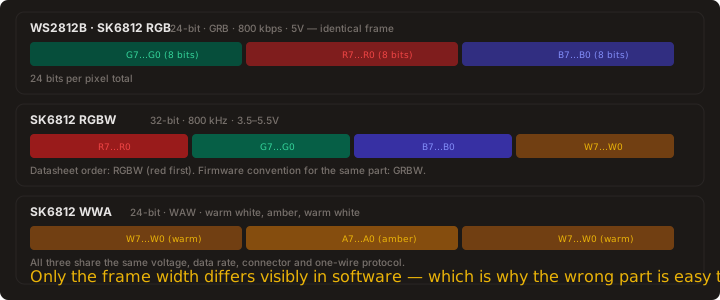
Here is the part that makes this harder than it looks. "SK6812" is not a chip designation, it is a family name, and the manufacturer publishes at least three different documents under it. One describes a 24-bit RGB part. One describes a 32-bit RGBW part. One describes a 24-bit WWA part with warm white and amber. They differ in frame length, in bit order, in LED current and in what the white channel does.
They also share a supply voltage, a data rate, a connector and a protocol. Which is exactly why the wrong one is so easy to buy by accident — nothing about the strip looks different until your controller sends the wrong number of bytes.
What Is Actually Different Between the WS2812B and the SK6812?
Start from the datasheets, not the product listings. Here is what the manufacturer documents state, side by side.
| Parameter | WS2812B | SK6812 RGB | SK6812 RGBW |
|---|---|---|---|
| Supply voltage | 3.5V – 5.3V | 3.7V – 5.5V | 3.5V – 5.5V |
| Data rate | 800 kbps | 800 kHz | 800 kHz |
| Bits per pixel | 24 | 24 | 32 |
| Frame order (datasheet) | GRB | GRB | RGBW |
| Frame order (firmware) | GRB | GRB | GRBW |
| Colour channels | 3 | 3 | 3 + white |
| LED current per colour channel | 20 mA (rated) | 12 mA (SK6812-012) | 9 mA (test condition) |
| Logic input high | 0.7 × VDD | 3.4 V at VDD = 5.0V | 3.4 V at VDD = 5.0V |
| Logic input low | 0.3 × VDD | 1.6 V at VDD = 5.0V | 1.6 V at VDD = 5.0V |
| PWM frequency (typ.) | — | 1.0 kHz | 1.2 kHz |
| Idle current (typ.) | — | 0.65 mA | 1 mA |
| Data output drive | — | 49 mA max | 49 mA max |
| Point-to-point reach | 5 m | > 10 m claimed | > 10 m claimed |
| Reverse-polarity protection | Claimed | Claimed | Not stated |
| White LED die | No | No | Yes |
One row deserves a footnote rather than a tick. Both the WS2812B and the SK6812 RGB datasheets explicitly state a reverse-connect or power-polarity protection module. The SK6812RGBW datasheet makes no such claim, so do not assume your RGBW strip survives a reversed supply — and note that reverse-connect protection in the control IC is not the same as the strip being safe, since the LEDs themselves are still connected across the reversed rail.
Read that table honestly and the conclusion is uncomfortable for the marketing pages: on the electrical and protocol side, these chips are close enough to be interchangeable. The SK6812 is not faster, not more efficient, and not more reliable. It has a slightly wider supply range and it adds a white LED.
Why every comparison page gets this wrong
They compare brightness and colour quality in photographs, which are not measurements, and they skip the datasheets, which are. The chip choice is a much simpler decision than those pages suggest.
Is the SK6812 32-Bit Claim Real, and in What Order?
Yes — but only for one of the three parts, and this is where most buying guides go wrong in the opposite direction.
The SK6812RGBW part is real, is widely manufactured, and genuinely sends 32 bits per pixel. Its datasheet states it directly: the 32-bit data is transmitted from the controller to DIN of the first element, and section 13 lays the frame out as R7 through R0, then G7 through G0, then B7 through B0, then W7 through W0.
Here is the subtlety that trips people up, and it is worth reading twice. That datasheet frame is RGBW — it transmits red first. Its own note reads "high starting, in order to send data (R7 - R6 - ...... ..W0)".
But the firmware convention is GRBW. Tasmota's API names the type `SK6812_GRBW` and describes it as taking 32-bit RGBW colours, and WLED's own FAQ says SK6812 is "commonly GRBW". So the datasheet order and the software order are genuinely different words describing the same part.
Practically: this is what the colour-order setting in your controller is for. If a strip shows red and green swapped, you have selected the wrong order — it is a one-setting fix, not a wiring fault. Read the order from the datasheet for the specific part you bought, and set it to match what your firmware expects.
What is not true is the popular claim that every SK6812 strip sends 32 bits. The plain SK6812 RGB part is 24-bit GRB. The SK6812 WWA part is 24-bit WAW — warm white, amber, warm white. Both have their own manufacturer documents, and neither is 32-bit.
Why this matters on the bench
Configure a 24-bit part as RGBW in WLED and the controller sends four bytes per pixel to a part that consumes three. The result is a colour rotation that shifts further along the strip, pixel by pixel — one of the harder LED faults to diagnose, because the first few pixels look nearly right. Ask for the full part number before you buy: SK6812, SK6812RGBW and SK6812WWA are not interchangeable in software.
One genuine ambiguity is worth flagging. The SK6812RGBW datasheet specifies its white die only as "W: White Color", then offers three colour-temperature options under the suffix — BW at 6000–7000K, NW at 4000–4500K, and WS at 2700–3000K. A listing that says only "SK6812 RGBW" does not tell you which white you are getting, and the tint difference between a 7000K and a 2700K die is immediately visible on a ceiling.
Does SK6812's White Channel Actually Look Better?
Yes, and this is the one genuine hardware advantage either chip has. It comes down to how a white pixel is produced.
With an RGB-only strip, white is manufactured: you drive all three colour channels to maximum, and the result is whatever the red, green and blue dies produce when summed. That light is a mix, and mixes have a tint. It is the slightly warm or slightly green cast you get from an RGB strip set to pure white — the reason the same strip looks fine in a demo and noticeably off-white on a ceiling.
An SK6812 RGBW pixel contains a fourth LED die dedicated to white. WLED exposes this as a dedicated white channel with an auto-calculate white from RGB option, and the choice of how that channel is driven changes the result measurably:
- Accurate — subtracts the calculated white from the RGB channels, removing the RGB-white tint. The trade-off is lower brightness, because energy is moved out of the colour channels.
- Brighter — leaves RGB untouched and mixes in the dedicated white. Maximum output, at the cost of a slight colour shift on pure whites.
- Dual — WLED's default. A manual white slider that falls back to Brighter when you set it to zero.
Which white you get matters as much as having one. The SK6812RGBW datasheet offers three under the part-number suffix: BW at 6000–7000K, NW at 4000–4500K, and WS at 2700–3000K. A 7000K die under a desk lamp looks clinical; a 2700K die on a workbench looks deliberate. Both are "SK6812 RGBW" on the listing.
The WWA variant goes further again, with warm white at 2800–3150K, blue-white at 5800–8000K, and amber at 1500–1800K. That is a tunable colour temperature, which is a lighting feature, not a decoration feature.
Worth knowing: WLED documents SK6812 WWA as supported but treated as if RGB, with full white-spectrum support still to come. If precise CCT control is the reason you are considering WWA, read that line before you buy.
How Much Power Does Each Strip Draw?
The WS2812B is specified at 20mA per colour channel, so 60mA per pixel at full white. The SK6812 parts run lower, and the figure is in the datasheet rather than the listing.
For the SK6812RGBW the datasheet contains no rated output current at all. The one current figure anywhere in it is in the test condition for the output rise and fall times: IOUT = 9mA. Across this manufacturer's document family that slot tracks the part's current version — the 12mA variant states IOUT = 12mA in the same two rows — so 9mA is the per-channel drive current by inference rather than by specification.
Three colour channels at 9mA is 27mA per pixel. Treat that as a floor, not a total: the package is rated 0.25 W, and 0.25 W at 5V is 50mA, so the part is built to draw considerably more than the colour channels alone when the white die is lit. WLED documents a typical 5V SK6812 RGBW strip at 18 W per metre, which across 60 pixels per metre is 300mA per pixel — the kind of figure a 5V RGBW strip genuinely pulls, and a reminder that the colour-only number is a floor rather than a budget.
SK6812RGBW, colour only: 9mA × 3 = 27mA per pixel
A 60-LED run:
WS2812B: 60 × 0.060 = 3.60A
SK6812RGBW: 60 × 0.027 = 1.62A (plus the white die)
Supply size after the 0.8 headroom rule:
WS2812B: 3.60 ÷ 0.8 = 4.50A → 5V 5A
SK6812RGBW: 1.62 ÷ 0.8 = 2.03A → 5V 3A
One caveat on that budget, and it is the one that catches people: the white die draws on top of the colour channels when both are lit. The datasheet states the colour-channel current but does not publish a separate white-channel figure, so for a strip that will be run mostly in white, size from the worst case you actually plan to display rather than from the colour-only sum. Full-output RGBW is more than 27mA per pixel.
Two things do not change. The ESP32 GPIO limit still caps a data pin at 40mA source, so the strip is never powered from the board. And the derating arithmetic is the same one covered in Ohm's Law for LED Strips — a supply sized for a WS2812B strip has genuine headroom on an SK6812 strip, and the same current budget covers both.
Can I Swap One for the Other in an Existing Build?
Yes, in most cases with one setting change. Both chips speak the same one-wire 800kbps protocol, so the wiring, the resistor, the level shifter and the controller all stay exactly as they are.
WLED has exactly one SK6812-specific type, and it carries one setting that is easy to miss: LEDs are 4-channel type (RGBW) under LED preferences. WLED's own FAQ lists forgetting it as a cause of wrong colours on an RGBW strip. Set the LED type, tick the 4-channel box, and only then does the controller send the 32-bit frame the part expects.
Beyond that checkbox, the change is the LED type on the strip's configuration, and this is where the frame width matters. A 24-bit RGB part keeps a 24-bit setting and its colour order is GRB, so no red-green inversion appears. A 32-bit RGBW part needs the RGBW setting with the white channel enabled — and getting that wrong on a 24-bit part is the byte-count fault described above.
There is a genuine physical difference here, and it is the one that trips people up most often on a bench: the wiring is identical, and nothing about the connector tells you what is inside.
The SK6812RGBW datasheet gives a four-pin package — VDD, DOUT, VSS, DIN — which is the same four pins the plain RGB part has, and a digital strip still runs three conductors: 5V, ground and data. There is no white wire. The fourth channel lives inside the LED die, so the extra bit travels down the same single data line as red, green and blue.
So why do some strips show four or five wires?
Those are analog strips. A non-addressable RGB strip needs one control line per colour, so it runs four wires, and an analog RGBW strip runs five. WLED documents it that way: four pins for analog RGB, five for analog RGBW. If your strip has a dedicated white wire, it is not an addressable SK6812 and it needs a completely different driver.
Two smaller things are worth knowing before you commit to a run length:
- Frame width. 24-bit and 32-bit parts are not interchangeable in software, even though the voltage, the connector and the wire count are identical. This is the failure that catches people, and it is invisible until it happens.
- Cut intervals. Both addressable families are sold cuttable per LED, so you can size a run exactly. The exception is 12V parts like the WS2814 and WS2811, which come in fixed 3-LED groups.
Because the channels differ, recalibrate brightness after swapping. A percentage that looks right on a 60mA RGB pixel is dim on a 27mA one, and the usual fix is a per-segment brightness limit rather than scaling every effect.
Which One Should You Buy?
Choose on the job, not on the specification table.
Buy the WS2812B when the strip is a display. Colour transitions, music reactivity, status indicators and anything where saturated colour is the entire point. It is cheaper per metre, every library and every tutorial assumes it, and its 60mA worst case is a number you can size a supply around without reading a second datasheet.
Buy the SK6812 when the strip is a light. A desk, a shelf, a workbench or a room where white has to look white — and anything that will sit on camera or be judged by a client. The dedicated white die fixes the tint, and the lower current per pixel gives you more run per supply.
If you are building both, the honest answer is that the two are cheap enough to mix. A WS2812B run for colour, an SK6812 run where white matters, one controller, and you set the LED type per segment in WLED.
What Do People Ask About LED Strip Chips?
Is SK6812 better than WS2812B?
SK6812 is not one chip but a family name covering three parts, and that is the first thing to understand. The plain SK6812 is 24-bit GRB, the SK6812RGBW is 32-bit, and the SK6812WWA is 24-bit WAW. Against the WS2812B, which is 24-bit GRB, the SK6812RGBW is better in one hardware respect that matters: it adds a dedicated white LED, producing genuinely white light instead of the tinted near-white you get by mixing RGB at full brightness. It also runs cooler, at 9mA per colour channel against 20mA, and its published point-to-point reach is longer. If your strip is purely a colour display, the WS2812B remains the better buy on price and on software support.
What is the white channel on an SK6812 strip for?
It is a fourth LED die that produces white light on its own, instead of white being synthesised by driving the red, green and blue dies to maximum. That matters because summing three colour dies produces a mixture with a visible tint, which is why RGB-only strips look off-white on a ceiling. WLED drives that channel through an auto-calculate mode, of which Accurate is the one that removes the tint by taking the white component out of the RGB channels, and Brighter is the one that leaves RGB untouched and simply adds the dedicated white for maximum output.
Is the SK6812 really 32-bit, and in what order?
Yes for the RGBW part, no for the others — and the order is where it gets interesting. The SK6812RGBW datasheet states that 32-bit data is transmitted and lays the frame out in section 13 as red, green, blue, then white, so the datasheet order is RGBW: it sends red first. The firmware convention is the other way round — Tasmota names the type SK6812_GRBW and WLED's FAQ says SK6812 is commonly GRBW. Both words describe the same 32-bit part, which is exactly why a strip can arrive with red and green swapped. That is a colour-order setting in your controller, not a wiring fault, and it is fixed by selecting the order your firmware expects. The plain SK6812 RGB part is 24-bit GRB and the SK6812WWA is 24-bit WAW, so neither of those is 32-bit at all.
How much current does an SK6812 strip draw?
The WS2812B is straightforward: 20mA per colour channel, so 60mA per pixel at full white, and 3.6A for a 60-LED run. The SK6812RGBW is not, because its datasheet publishes no rated output current — the only figure in it is a 9mA test condition, which by the pattern of the manufacturer's other documents is the per-channel colour current. That gives 27mA per pixel for the colour channels alone, and 1.62A across 60 LEDs. Do not size a supply from that number. The package is rated 0.25W, which at 5V is 50mA per pixel, and WLED documents a typical 5V SK6812 RGBW strip at 18W per metre — about 60mA per pixel at 60 per metre. A 60-LED RGBW run in real use lands near 3.6A, the same as the WS2812B, so budget for a 5V 5A supply and treat the lower current figure as a colour-only floor.
Can I run an SK6812 strip on the same ESP32 and WLED setup?
Yes, and the wiring does not change. Every one of these parts uses the same one-wire protocol at the same 800kbps rate, so the 330Ω data resistor, the level shifter, the shared ground and the supply are all identical. What does change is the LED type in the strip configuration, and here the frame width is the thing to get right: a 24-bit part keeps a 24-bit setting, a 32-bit RGBW part needs the RGBW setting with the white channel enabled and driven in whichever auto-white mode you want. Recalibrate brightness afterwards, because a limit that suits a 60mA pixel is too dim on a 27mA one.
What does a correct 60-LED setup cost?
A 60-LED WS2812B run needs a 5V 5A supply at about $12, a 60-per-metre strip at $9 for 2m, an ESP32 board at $6, a 330Ω resistor for pennies and a fuse holder plus fuse at about $2, which is $30 in total. The same 60 pixels on SK6812RGBW draw 1.62A for the colour channels, so a 5V 3A supply at about $9 is enough and the build lands nearer $25, though the RGBW strip itself costs more per metre than the plain RGB one. On both chips the two items beginners skip are the supply headroom and the fuse, and both decide whether the build survives.
Done-for-You Playbook
USB-C Power Supply Conversion — Builder's Guide
The current-budget method behind this comparison scales to real builds: supply selection tables, derating rules, fuse sizing, and the client pricing model for turning dead adapters into working supplies. Skip the guesswork.
Where Did the Specifications in This Comparison Come From?
Every figure above comes from a manufacturer datasheet rather than a retailer listing. The WS2812B figures come from the Worldsemi datasheet. The SK6812 figures come from three separate documents, and the distinction between them is the point of this article: the RGB part from the LED Color technical datasheet (SPC/SK6812 rev. 01, 24-bit GRB), the RGBW part from the Dongguan Opsco specification (SPC/SK6812RGBW rev. 01, 32-bit RGBW), and the WWA part from its own datasheet (24-bit WAW). The 12mA current variant is documented separately as SK6812-012 by iPixel (OSK-SPC-SK6812-012). The auto-calculate white modes, the supported LED type list and the SK6812 WWA handling note come from the WLED project documentation.